
Event Handlers
Write code that reacts to book events — checked transactions, new accounts, comments — to automate calculations, sync data between books, and call external services. Covers response format, loop prevention, and replay.
Event handlers are the code that reacts to events in your Bkper Books. When a transaction is checked, an account is created, or any other event occurs, your handler receives it and can take action — calculate taxes, sync data between books, post to external services, and more.

How it works
- You declare which events your app handles in
bkper.yaml - Bkper sends an HTTP POST to your webhook URL when those events fire
- Your handler processes the event and returns a response
On the Bkper Platform, events are routed to /events on your app’s single Worker — including local development via tunnels. For self-hosted setups, you configure the webhook URL directly.
Agent identity
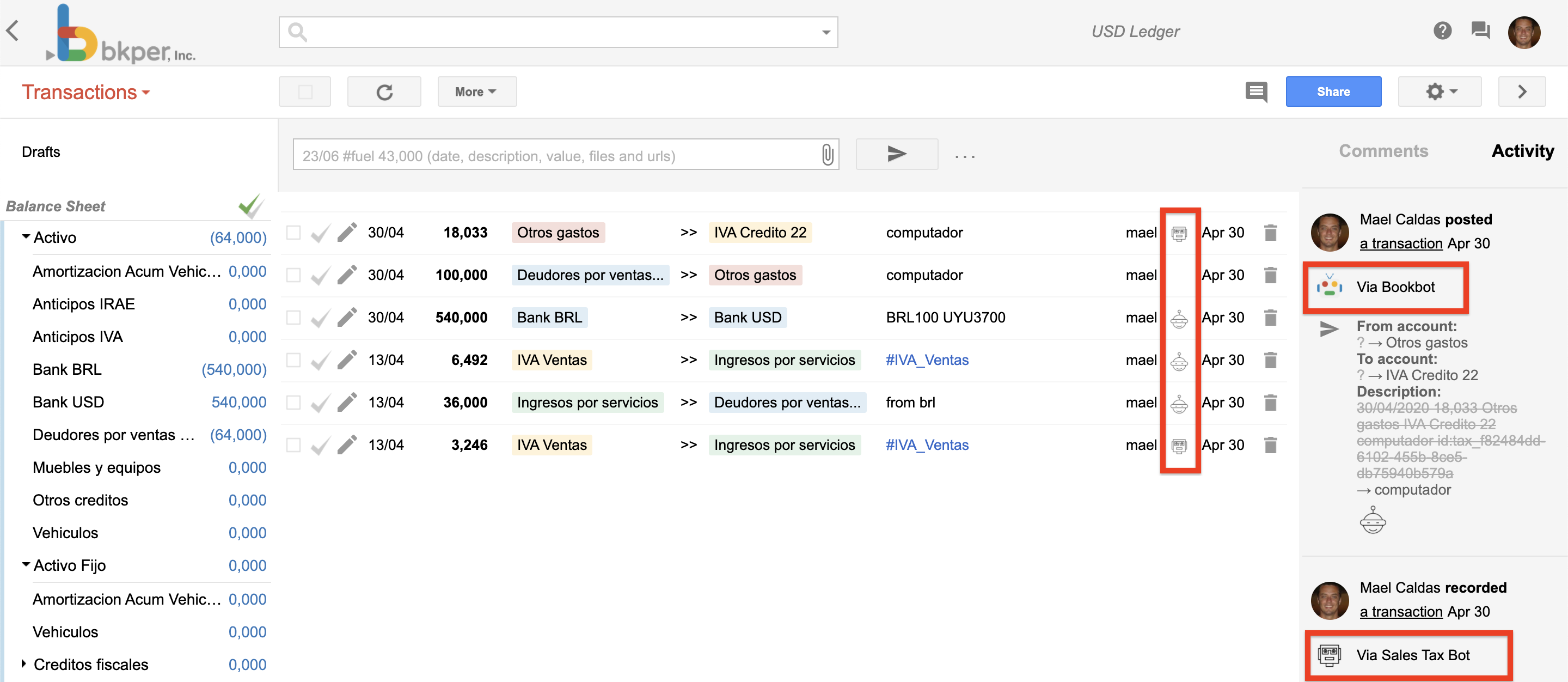
Event handlers run on behalf of the user who installed the app. Their transactions and activities are identified in the UI by the app’s logo and name:
Responses
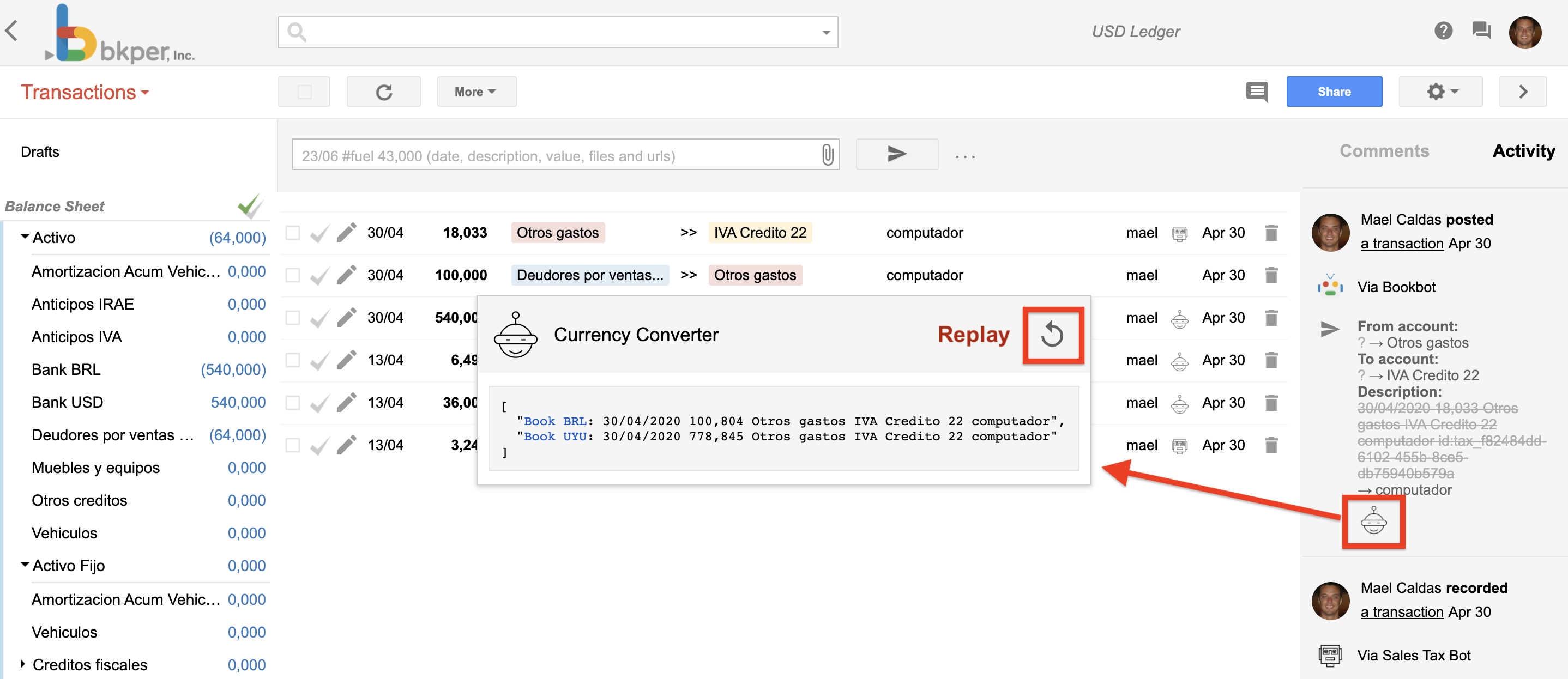
Handler responses are recorded in the activity that triggered the event. You can view and replay them by clicking the response at the bottom of the activity:
Response format
Your handler must return a response in this format:
{ result?: string | string[] | boolean; error?: string; warning?: string }- The
resultis recorded as the handler response in the book activity - If you return
{ result: false }, the response is suppressed and not recorded - Errors like
{ error: "This is an error" }show up as error responses
To show the full error stack trace for debugging:
try { // handler logic} catch (err) { return { error: err instanceof Error ? err.message : String(err) };}HTML in responses
If you return an HTML snippet (e.g., a link) in the result, it will be rendered in the response popup.
Development mode
Event handlers run in Development Mode when executed by the developer or owner of the App.
In development mode, both successful results and errors are shown as responses:
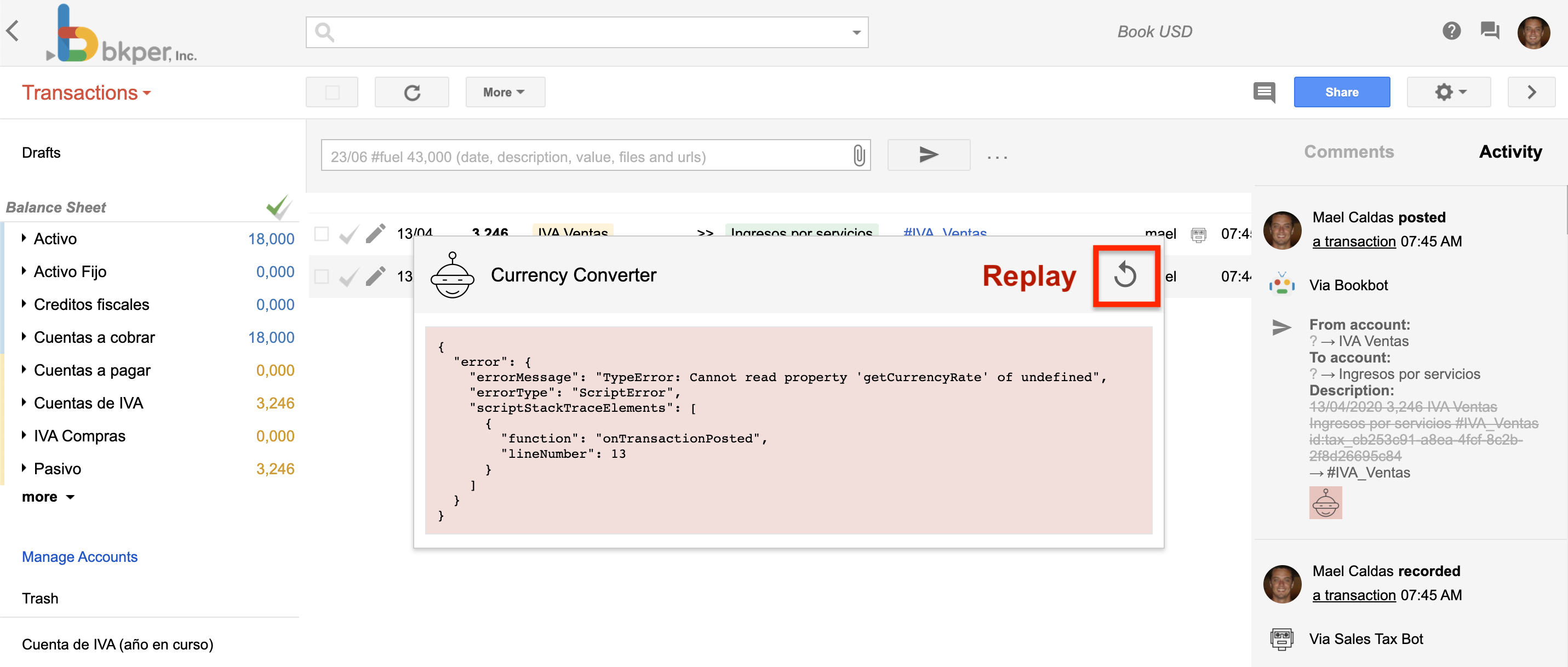
You can click a response to replay failed executions — useful for debugging without recreating the triggering event.
To find transactions with bot errors in a book, run the query:
error:truePreventing loops
When your event handler creates or modifies transactions, those changes fire new events. To prevent infinite loops, check the event.agent.id field:
function handleEvent(event: bkper.Event) {    // Skip events triggered by this app    if (event.agent?.id === 'your-app-id') {        return { result: false };    }
    // Process the event    // ...}
This pattern is essential for any handler that writes back to the same book.
Authentication
Platform-hosted event handlers use the same server-side Bkper API pattern as /api/* routes:
const bkper = new Bkper();const book = new Book(event.book, bkper.getConfig());Dispatch consumes the event delivery token, strips platform headers before your Worker runs, and platform outbound auth injects the OAuth token and app agent identity on Bkper API calls.
Do not read bkper-oauth-token, bkper-agent-id, or Authorization headers in platform app code.
For self-hosted setups, the event auth headers are sent to both webhookUrl and webhookUrlDev and must be handled directly by your infrastructure.
Event routing pattern
On the Bkper Platform, your server Worker uses Hono to receive webhook calls at /events. A typical pattern routes events by type:
import { Bkper, Book } from 'bkper-js';
app.post('/events', async c => {    const event: bkper.Event = await c.req.json();
    if (!event.book) {        return c.json({ error: 'Missing book in event payload' }, 400);    }
    const bkper = new Bkper();    const book = new Book(event.book, bkper.getConfig());
    switch (event.type) {        case 'TRANSACTION_CHECKED':            return c.json(await handleTransactionChecked(book, event));        default:            return c.json({ result: false });    }});
The Event object
The event payload has the following structure:
{    /** The id of the Book associated to the Event */    bookId?: string;
    /** The Book object associated with the Event */    book?: {        agentId?: string;        collection?: Collection;        createdAt?: string;        datePattern?: string;        decimalSeparator?: "DOT" | "COMMA";        fractionDigits?: number;        id?: string;        lastUpdateMs?: string;        lockDate?: string;        name?: string;        ownerName?: string;        pageSize?: number;        period?: "MONTH" | "QUARTER" | "YEAR";        periodStartMonth?: "JANUARY" | "FEBRUARY" | "MARCH" | "APRIL"            | "MAY" | "JUNE" | "JULY" | "AUGUST" | "SEPTEMBER"            | "OCTOBER" | "NOVEMBER" | "DECEMBER";        permission?: "OWNER" | "EDITOR" | "POSTER" | "RECORDER"            | "VIEWER" | "NONE";        properties?: { [name: string]: string };        timeZone?: string;        timeZoneOffset?: number;    };
    /** The user in charge of the Event */    user?: {        avatarUrl?: string;        name?: string;        username?: string;    };
    /** The Event agent, such as the App, Bot or Bank institution */    agent?: {        id?: string;        logo?: string;        name?: string;    };
    /** The creation timestamp, in milliseconds */    createdAt?: string;
    /** The event data */    data?: {        /** The object payload. Depends on the event type. */        object?: any;        /** The object previous attributes when updated */        previousAttributes?: { [name: string]: string };    };
    /** The unique id that identifies the Event */    id?: string;
    /** The resource associated to the Event */    resource?: string;
    /** The type of the Event */    type?: EventType;}
The event payload is the same structure exposed by the REST API. If you use TypeScript, add the @bkper/bkper-api-types package to your project for full type definitions.
For update events, data.previousAttributes contains the fields that changed and their previous values — useful for computing diffs or reacting only to specific field changes.
Event types
Declare which events your app handles in bkper.yaml:
events: - TRANSACTION_CHECKED - TRANSACTION_POSTED - ACCOUNT_CREATEDThe complete current set of event types:
| Event | Description |
|---|---|
FILE_CREATED | A file was attached to the book. |
FILE_UPDATED | An attached file was updated. |
TRANSACTION_CREATED | A draft transaction was created. |
TRANSACTION_UPDATED | A transaction was updated. |
TRANSACTION_DELETED | A transaction was deleted. |
TRANSACTION_POSTED | A draft transaction was posted and now affects balances. |
TRANSACTION_CHECKED | A posted transaction was checked (reviewed and locked). |
TRANSACTION_UNCHECKED | A checked transaction was unchecked and becomes editable again. |
TRANSACTION_RESTORED | A deleted transaction was restored. |
ACCOUNT_CREATED | An account was created. |
ACCOUNT_UPDATED | An account was updated. |
ACCOUNT_DELETED | An account was deleted. |
QUERY_CREATED | A saved query was created. |
QUERY_UPDATED | A saved query was updated. |
QUERY_DELETED | A saved query was deleted. |
GROUP_CREATED | A group was created. |
GROUP_UPDATED | A group was updated. |
GROUP_DELETED | A group was deleted. |
COMMENT_CREATED | A comment was added. |
COMMENT_DELETED | A comment was deleted. |
COLLABORATOR_ADDED | A collaborator was added to the book. |
COLLABORATOR_UPDATED | A collaborator’s permissions were updated. |
COLLABORATOR_REMOVED | A collaborator was removed from the book. |
INTEGRATION_CREATED | An integration was created in the book. |
INTEGRATION_UPDATED | An integration was updated. |
INTEGRATION_DELETED | An integration was deleted. |
BOOK_CREATED | A book was created. |
BOOK_AUDITED | A balances audit completed for the book. |
BOOK_UPDATED | Book settings were updated. |
BOOK_DELETED | The book was deleted. |