
AI Tooling
How AI tools can consume Bkper docs and context.
Every page on bkper.com is available as clean Markdown. Navigation chrome — sidebar, header, footer — is stripped, reducing token usage for AI tools.
Formats
Three ways to get docs into your AI. Pick the one that matches your workflow.
llms.txt — explore
A structured index of every article with descriptions. Start here when you want your AI to browse and pick what to read.
/llms.txt— all docs/docs/guides/llms.txt— user-facing guides/docs/build/llms.txt— developer docs/docs/api/llms.txt— all API libraries at a glance
llms-full.txt — deep dive
The complete text of every article in one file. No links to chase, no extra requests. Use this when you need comprehensive context on a specific topic.
/llms-full.txt— all docs/docs/build/apps/llms-full.txt— all app docs/docs/build/scripts/llms-full.txt— all script docs
.md — single page
Any individual page as Markdown. Use this when you already know the exact page you need.
Append .md to the URL:
https://bkper.com/about.mdhttps://bkper.com/docs/core-concepts.mdcurl https://bkper.com/docs/core-concepts.mdOr request it via the Accept header — no URL modification needed:
curl https://bkper.com/docs/core-concepts \ -H "Accept: text/markdown"The response includes an x-markdown-tokens header with the estimated token count, which agents can use to plan context window usage:
HTTP/2 200content-type: text/markdown; charset=utf-8vary: Acceptx-markdown-tokens: 1850Every documentation page also has a Page Options dropdown in the right sidebar:
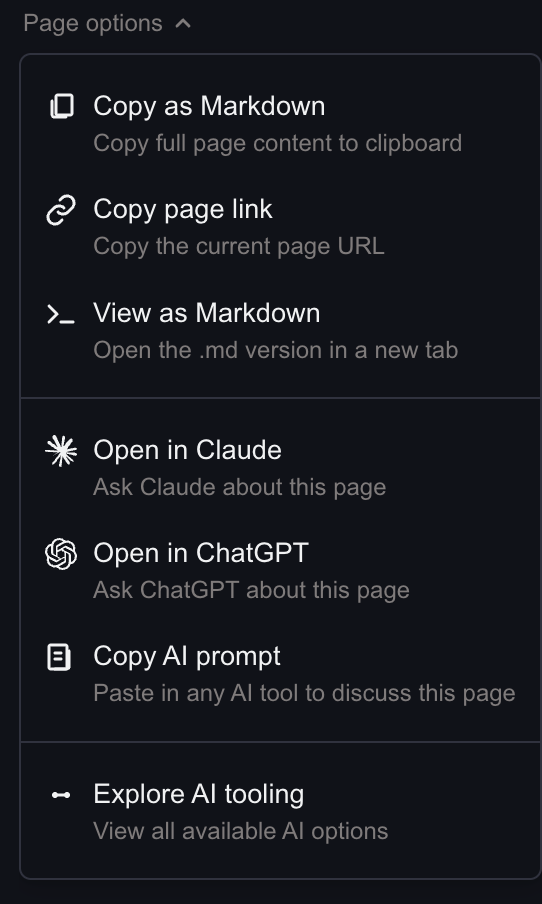
Copy the page as Markdown, open it directly in Claude or ChatGPT, or grab a ready-made prompt for your AI tool of choice.
API References
API reference endpoints compile the library overview and full spec into a single compact document optimized for agent workflows:
/docs/api/rest.md— endpoints, parameters, and data models/docs/api/bkper-js.md— bkper-js README + TypeScript definitions/docs/api/bkper-gs.md— bkper-gs README + TypeScript definitions/docs/api/bkper-api-types.md— shared TypeScript type definitions/docs/api/bkper-web-auth.md— OAuth browser SDK
Compiled Markdown vs raw source (overview + openapi.json or .d.ts):
| Library | Raw (tokens) | .md (tokens) | Reduction |
|---|---|---|---|
| REST API | ~38K | ~9K | 4× |
| bkper-js | ~32K | ~18K | 1.8× |
| bkper-gs | ~22K | ~12K | 1.9× |
| bkper-api-types | ~12K | ~5K | 2.4× |
| bkper-web-auth | ~2K | ~2K | ~1× |
Agent Skills
For coding agents that support the Agent Skills standard, install the Bkper skill for built-in platform knowledge:
npx skills add bkper/skills --skill bkperThis bundles all Bkper docs — core concepts, CLI reference, SDK types, and financial reporting workflows — into a single skill the agent loads automatically when working on Bkper tasks. It saves you from manually pasting Markdown URLs into the context window. Source on GitHub.
Ready to build? See Coding Agents for how to use the Bkper CLI Agent and other coding agents with Bkper.