

Delete Bkper Data and Close Account
How to delete your data, revoke access, unsubscribe from emails, and fully close your Bkper account.
You have full control over your data in Bkper. If you no longer need your data, you can delete it at any time without prior notice.
Delete data
To delete recorded data from Bkper, delete your books. Before deleting a book, make a backup by using the Bkper Add-on for Google Sheets to fetch all transactions to a spreadsheet, or download a CSV file to your computer.
Remove Google account access
To revoke Bkper’s access to your Google Account, go to apps connected to your Google Account.
Select Bkper on the list and click Remove.
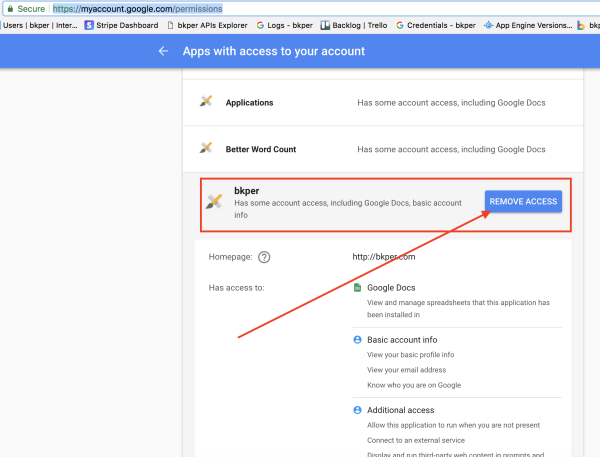
After revoking access, Bkper will no longer have access to any data from your Google Account. Note that this only removes the authorization — any recorded data is preserved in Bkper. To delete the data itself, delete your books as described above.
Mobile app
To stop using Bkper on your phone, uninstall the Bkper app following the instructions for your device.
Unsubscribe from emails
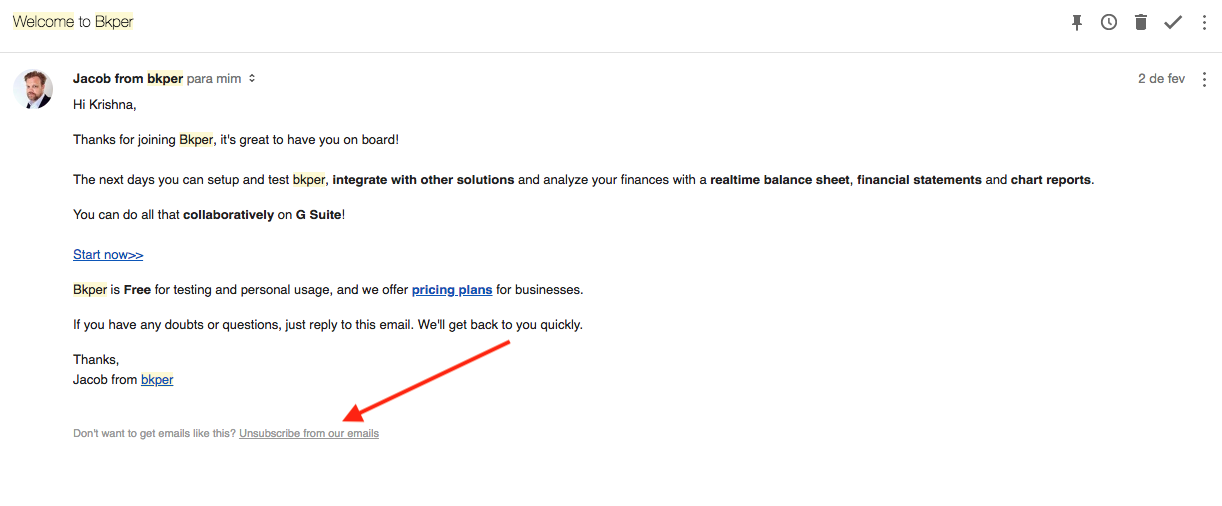
Stop receiving emails from Bkper by clicking any unsubscribe link at the bottom of Bkper emails.
Deceased account holders
If you need to cancel the subscription or delete the data of someone who has passed away, send an email to support@bkper.com. The Bkper team will help with the cancellation and any data removal.