

Context Menu
Add a custom item to the Transactions page More menu that opens a URL pre-populated with the current book context — query, account, date range, and more.
Apps can add context menu items on the Transactions page More menu in your Books. This lets you open dynamically built URLs with reference to the current Book’s context — the active query, selected account, date range, and more.
Embedded interfaces should follow the App Quality Guidelines for visual consistency, startup behavior, and Book-context verification.
How it works
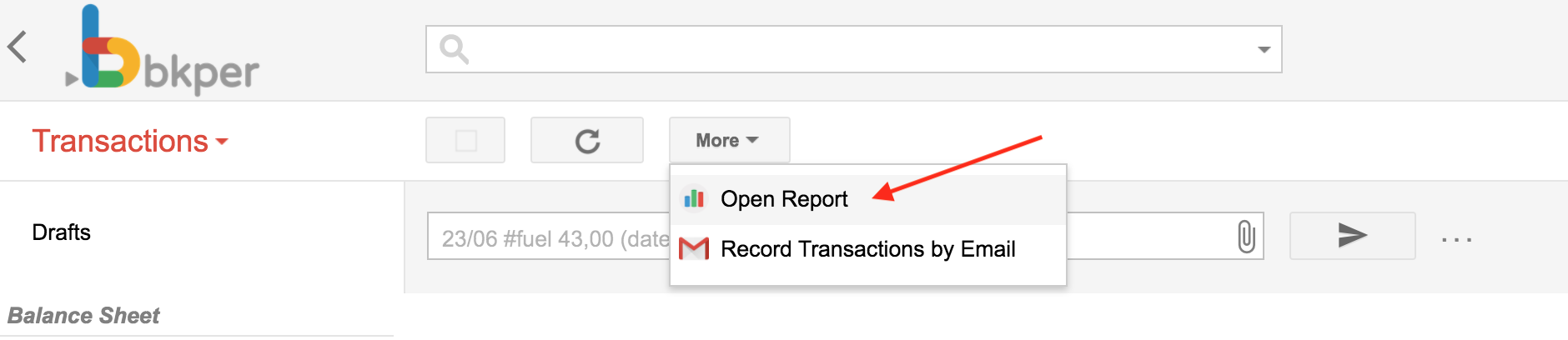
Once you install an App with a menu configuration, a new menu item appears in your Book:
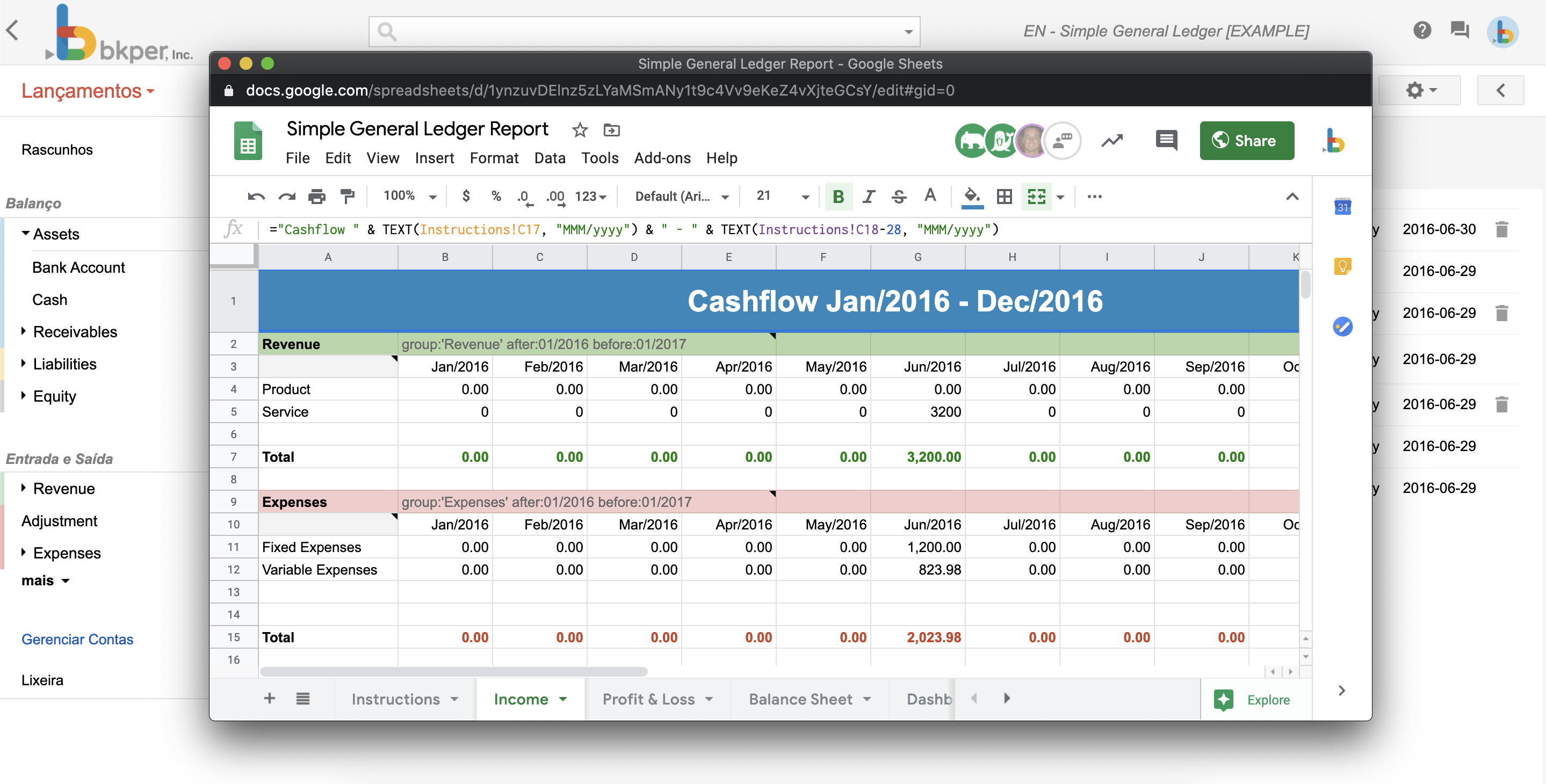
When clicked, a popup opens carrying the particular context of that book at that moment:
Configuration
Configure the menu URL in your bkper.yaml:
menuUrl: https://my-app.bkper.app?bookId=${book.id}&query=${transactions.query}When the user clicks the menu item, the URL expressions ${xxxx} are replaced with contextual information from the Book:
https://my-app.bkper.app?bookId=abc123&query=account:SalesWhere abc123 is the current Book id and account:Sales is the current query being executed.
Development URL
Use menuUrlDev to keep developer testing separate from production. The app template points it to the preview deployment:
menuUrl: https://my-app.bkper.app?bookId=${book.id}&query=${transactions.query}menuUrlDev: https://my-app-preview.bkper.app?bookId=${book.id}&query=${transactions.query}During local development, you can instead point it to the local Worker URL at http://localhost:8787. The development URL is used when an app developer clicks the menu item.
Menu open mode
Control how the menu opens with menuOpenMode:
menuOpenMode: SIDEBAR| Mode | Behavior |
|---|---|
SIDEBAR | Opens in a narrow side panel (default). |
EXPANDED | Opens in a wider panel with more room for complex UIs. |
NEW_TAB | Opens the menu URL in a new browser tab instead of an embedded panel. |
An EXPANDED panel returns to sidebar size the first time the App changes the Book after opening, so the person sees the change.
Live context updates
Bkper keeps embedded Apps informed of context changes without reloading the iframe, allowing them to preserve their current state. For Apps opened in SIDEBAR or EXPANDED, Bkper communicates those changes by sending the updated App URL to the iframe when its origin remains the same:
{ type: 'bkper:app-url-changed', url: 'https://my-app.bkper.app?bookId=abc123&query=account:Sales',}Listen for the message in the App:
const BKPER_ORIGIN = 'https://bkper.app';
window.addEventListener('message', event => {    // Verify that the trusted Bkper parent sent the message.    if (event.source !== window.parent || event.origin !== BKPER_ORIGIN) return;
    // Verify that this is a valid App URL update.    const message = event.data;    if (message?.type !== 'bkper:app-url-changed' || typeof message.url !== 'string') return;
    // Parse the updated URL, ignoring malformed URL strings.    let nextUrl;    try {        nextUrl = new URL(message.url);
        // Accept only URLs belonging to this App.        if (nextUrl.origin !== window.location.origin) return;    } catch {        return;    }
    // Apply the validated context update.    handleAppUrlChange(nextUrl);});
handleAppUrlChange is App logic, best in the module that owns the URL: it takes the Book’s context, keeps the App’s own state, such as its selection, and replaces the URL without reloading. The App can update internal state, notify components, refresh data, change its UI, or ignore the message. Bkper only communicates the new URL; it does not reload the iframe or apply the context inside the App.
Apps opened with NEW_TAB do not receive this message. Their context is set only by the URL used to open the tab.
Navigating the Book
Embedded Apps can take the user to a page in Bkper, such as a chart or a transaction, without reloading Bkper or the App. Bkper navigates around the panel and keeps the App open, so the user can follow the App through the Book.
The App asks Bkper to navigate with a message. Bkper decides whether and how to navigate.
Host support
Each time the App iframe finishes loading, Bkper announces the requests it supports:
{ type: 'bkper:host-ready', supports: ['navigate', 'show-book', 'expand', 'login'],}Send each request only after receiving this message with its name in supports:
bkper:navigatewithnavigate.bkper:show-bookwithshow-book.bkper:expandwithexpand.bkper:loginwithlogin.
Until then, keep the normal link behavior. Register the message listener when the App starts, so it does not miss the message.
Apps opened with NEW_TAB do not receive this message, because they have no Bkper parent.
Requesting navigation
Post the Bkper URL to the parent:
window.parent.postMessage( { type: 'bkper:navigate', url: 'https://bkper.app/books/abc123/transactions?query=account%3ASales&charts=true', }, BKPER_ORIGIN);Bkper ignores the message when any of these is true:
- It does not come from the App iframe currently open in the panel.
- It does not come from that iframe’s own origin.
urlis not an absolute URL on the Bkper origin.urlincludes a username or password.
For a valid request, Bkper navigates as follows:
- Book pages (Transactions and Accounts, under
/books/{bookId}/): Bkper navigates without reloading and adds a browser history entry, so Back returns to the previous page. The App stays open: Bkper sets the App in the URL, replacing any other App given there. An expanded panel returns to sidebar size, so the destination is visible. - Other Bkper pages: Bkper loads the page as a normal navigation, which closes the panel.
The usual Bkper rules apply at the destination:
- The user needs access to the destination Book.
- When the destination is in the same Book, the App receives
bkper:app-url-changedif its context changes, as described in Live context updates. - When the destination is another Book, Bkper opens the App again for that Book if it is installed there, and closes it otherwise.
Bkper does not reply to bkper:navigate.
Send bkper:navigate only in response to a user action, such as a click. Bkper cannot verify this, and navigation the user did not ask for interrupts their work.
Example
Keep links in the App as real links that open in a new tab, so they work wherever navigation is not available, such as in a NEW_TAB App or an older Bkper version:
<a href="https://bkper.app/books/abc123/transactions?query=account%3ASales" target="_blank">Sales</a>Then turn plain clicks on Bkper links into navigation requests once Bkper supports them:
const BKPER_ORIGIN = 'https://bkper.app';let canNavigate = false;
window.addEventListener('message', event => {    // Verify that the trusted Bkper parent sent the message.    if (event.source !== window.parent || event.origin !== BKPER_ORIGIN) return;
    const message = event.data;    if (message?.type === 'bkper:host-ready' && Array.isArray(message.supports)) {        canNavigate = message.supports.includes('navigate');    }});
document.addEventListener('click', event => {    // Keep modified and non-primary clicks as normal links, such as opening a new tab.    if (!canNavigate || event.defaultPrevented || event.button !== 0) return;    if (event.metaKey || event.ctrlKey || event.shiftKey || event.altKey) return;
    // Only links to Bkper itself become navigation requests.    const link = event.composedPath().find(node => node instanceof HTMLAnchorElement);    if (!link || new URL(link.href).origin !== BKPER_ORIGIN) return;
    event.preventDefault();    window.parent.postMessage({ type: 'bkper:navigate', url: link.href }, BKPER_ORIGIN);});
Showing the Book
An expanded panel covers the Book. When the user changes what the Book shows behind it, such as by clicking an account, the App can ask Bkper to let the user see the change:
window.parent.postMessage({ type: 'bkper:show-book' }, BKPER_ORIGIN);Bkper ignores the message when it does not come from the App iframe currently open in the panel, or not from that iframe’s own origin. For a valid request, an expanded panel returns to sidebar size; otherwise nothing changes. Bkper does not reply.
The App decides when to ask. An App whose panel already reflects the Book’s context, such as a report rebuilt for each query, may prefer to stay expanded and never send it. To follow the user’s changes, send it when a bkper:app-url-changed message changes the context the Book shows.
Asking for room
When the user opens something in the App that needs more room than the sidebar, such as a report or a preview, the App can ask Bkper to expand the panel:
window.parent.postMessage({ type: 'bkper:expand' }, BKPER_ORIGIN);Bkper ignores the message when it does not come from the App iframe currently open in the panel, or not from that iframe’s own origin. For a valid request, a panel at sidebar size expands; an expanded panel, or one already full size on a phone, stays as it is. Bkper does not reply.
An expansion the App asked for counts as the user’s own: the App’s later Book events do not return the panel to sidebar size. To give the room back, such as when the user closes what they opened, send bkper:show-book, and only if the App did get wider: on a phone, where the panel is already full size, bkper:show-book minimizes it.
Send bkper:expand only in response to a user action, such as a click. Bkper cannot verify this, and a panel that grows by itself covers the Book the user is working in.
Signing in
An App in the panel shares the user’s Bkper session. When the App finds no session, it cannot sign in inside its iframe: Google refuses to show its sign-in page in a frame, and shows a 403 error instead. The App asks Bkper to sign in for it:
window.parent.postMessage({ type: 'bkper:login' }, BKPER_ORIGIN);Apps using @bkper/web-auth do not send this themselves: inside a frame, login() sends it instead of redirecting. Outside a frame, such as a NEW_TAB App or the App opened on its own, login() redirects to sign-in as usual.
Bkper ignores the message when it does not come from the App iframe currently open in the panel, or not from that iframe’s own origin. For a valid request, Bkper first checks its own session:
- No session: Bkper signs the whole page in, then returns the user to the same Book with the App open.
- A valid session: the App’s check was out of date, so Bkper reloads the App once. If the App asks again while Bkper is still signed in, Bkper ignores it until the page reloads, so an App can never take the user out of their Book.
- Bkper cannot tell, such as when offline: nothing changes.
Bkper does not reply.
Available expressions
The menu URL supports these dynamic expressions:
| Expression | Description |
|---|---|
${book.id} | The current Book ID |
${transactions.query} | The current query string |
${account.id} | The selected account ID |
${account.name} | The selected account name |
${group.id} | The selected group ID |
${group.name} | The selected group name |
For the full list of accepted expressions, see the Menu URL variables reference.